
Meta Muse review: what our hands-on tests found
Between September 30 and October 5, 2026, we ran 11 tests of Muse on a real free-plan account: research tasks, reminders, an email approval, a goal, WhatsApp, Amazon, and the privacy and usage settings. Here’s what held up and what didn’t.
Quick verdict
Muse is a genuinely useful free AI agent for everyday errands, as long as you watch what it does. In our tests it handled research, reminders and a recurring check without fuss, and it stopped to ask before sending an email. The downsides are real: it can take a minute or more to get going, it’s limited to the US and Canada, some sites (Amazon) block it, and it got one detail obviously wrong. Try it on the free plan with low-risk tasks; don’t hand it money or important accounts unsupervised yet.
How we tested
TestedAll tests ran on one real Muse account on the free plan, mostly in the muse.ai web app (Chrome, Windows 11), plus one message sent from WhatsApp on a phone. Every action that could send, buy or change something was approved in advance with exact wording. We don’t publish the account’s chats, connected accounts or agent name. We have no business relationship with Meta. See how we label evidence.
Test results at a glance
| Test | What happened | Verdict |
|---|---|---|
| Research task (coffee shops + hours) | Three good picks with hours in about 2½ minutes, including a minute stuck on “Connecting…”. One listed opening time (4:30 AM) looked wrong. | Useful, verify details |
| Reminder: set and cancel | Set for 9 AM the next day, then cancelled; about 20 seconds each. | Worked |
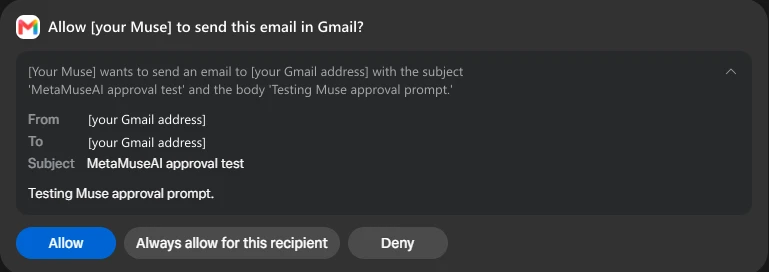
| Send an email (approval test) | Muse stopped with an approval prompt (Allow / Always allow for this recipient / Deny). We denied; nothing was sent. | Worked as designed |
| Price check on Amazon | Muse said Amazon blocked its browsing, refused to solve a bot check, and offered other retailers. | Blocked by Amazon |
| Create and delete a goal | A daily website check set up by chat in about a minute, then deleted by chat. The Goals tab itself was slow to load. | Worked; tab slow |
| WhatsApp message | A message sent in WhatsApp showed up on muse.ai within about a minute, view-only. | Worked |
| Connectors list | 54 connectors in Settings on September 30 (Gmail, Google apps, Notion, Slack, GitHub and more). Several announced partners weren’t listed yet. | Broad, not complete |
| Usage and plans | Weekly allowance shown only as “% used” with a reset date; the upgrade screen priced plans in local currency. | Clear-ish, no token counts |
| Privacy controls | “Help improve our AI models” was on in our account; permission defaults set to “Ask for some actions”. | Check your settings |
What’s good
- It actually does things. Unlike a chatbot, Muse ran a research task on its own computer, set a reminder, and created a recurring background check, all from plain-language requests. See our first tasks.
- It asks before important actions. When we asked it to send an email, it showed exactly what it would send and waited. Denying it worked cleanly.
- It’s free to start. The free plan was enough for every test on this page; light testing over two days used about 12% of the weekly allowance.
- It reaches you where you are. The same agent works on the web, on phones and in WhatsApp, and reminders come back in the chat where you set them.
- It works in the background. Goals keep running after you close the app. How Goals, Feed and Ideas work.
What’s not
- It’s slow to start. Our first task sat on “Connecting…” for about a minute, and the Goals tab once took 25 seconds to load and later stuck on placeholders. Fixes for common problems.
- It can be wrong. One coffee shop’s hours (opening at 4:30 AM) looked implausible. Meta itself warns that Muse “can make mistakes or take unexpected actions.”2
- Some sites shut it out. Amazon blocks Muse, so shopping there is off the table. Why.
- It’s only in the US and Canada. Availability details.
- Privacy needs attention. The switch that lets Meta use your Muse interactions to improve its AI was on in our account; you can turn it off. How.
- A rocky security start. ReportedIn its first weeks, a researcher disclosed a Mac-app flaw that Meta hot-fixed within a day,4 and Reuters reported a vulnerability Meta rated SEV-2, after which Meta added a clearer in-app safety warning.3 Full safety timeline.
- Usage is a black box. The app shows a percentage, not tokens, and Meta doesn’t say how many tokens a task uses. More on limits.
Who should use it
- Good fit
- People in the US or Canada who want help with research, reminders, email drafts and recurring checks, and who are happy to approve each important step.
- Wait
- Anyone who wants it to shop, pay or manage sensitive accounts without supervision, or who mainly shops on Amazon.
- Look elsewhere
- Readers outside the US and Canada, where Muse isn’t available. See Muse alternatives and Muse vs Gemini Spark.
Price
Free plan with a weekly usage limit; Power $20/month (500 million Muse tokens a week); Maximum $100/month (3 billion a week). 18+ with a Meta account.1 TestedThe upgrade screen showed prices in our account’s local currency, so check the final amount before paying. Full pricing.
What we haven’t tested
Not testedPaid plans, real purchases, the Mac app, the iPhone and Android apps’ own screens, voice, custom connectors, and setting up a brand-new account. We’ll update this review as we test them.
Sources
- About Muse subscriptions Meta Help Center · checked Oct 5, 2026
- How Muse works with your guidance and approval Meta Help Center · checked Oct 5, 2026
- Meta bolsters Muse safety warning after security vulnerability found Reuters, via Yahoo Tech · Sept 25, 2026
- Meta hot-fixes Muse zero-day Unite.AI · Sept 22, 2026
Last tested: 2026-10-05. Our tests are on one account and may not match yours. Tell us if you see something different.
Frequently asked questions
Is Meta Muse any good?
For everyday tasks, yes, with supervision. In our tests it found information, set and cancelled reminders, created and deleted a background goal, and stopped to ask before sending an email. It was also slow to start, got one detail implausibly wrong, and couldn’t shop on Amazon.
Is Meta Muse free?
Yes. There’s a free plan with a weekly usage limit. Paid plans are Power ($20/month) and Maximum ($100/month) in the US. All our tests ran on the free plan.1
Is Meta Muse safe to use?
It asks before important actions, and that worked in our test. But its first weeks included reported security flaws, and an AI-training switch was on in our account. Start with low-risk tasks and check your settings. See our safety guide.
What didn’t you test?
Paid plans, purchases, the Mac app, the phone apps’ own screens, voice, and new-account setup. Those parts of this review rely on Meta’s documentation or aren’t covered.