
Muse invite codes: how the 1 billion token referral bonus works
You don’t need an invite code to use Muse. A code is a referral bonus: when a new user redeems one in time, both people get extra Muse tokens. Here’s exactly how it works, taken from the app itself.
Quick answer
A Muse invite code is a referral bonus, not a ticket in. Anyone eligible can join Muse without one. When a new user redeems someone’s code in Settings within 48 hours of joining, both people get 1 billion Muse tokens, according to the app. You’ll find your own code by selecting Invite at the top of your Muse chat, and each code has a limited number of uses.
How we checked
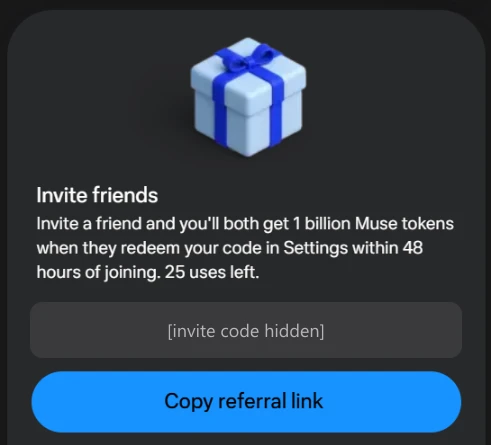
TestedWe opened the Invite panel on our own Muse account on September 30, 2026 (muse.ai web app). We didn’t share or redeem any code. Our own code is hidden in the screenshot below, and we don’t publish invite codes on this site.
Do you need an invite code to join Muse?
No. Muse is open to adults 18 and older in the US and Canada with a Meta account.24
The confusion comes from before launch. ReportedIn early September 2026, Muse was in a closed test that used a waitlist and invite codes for access.3 Since the public launch on September 8, codes work as a referral bonus. Meta’s Help Center doesn’t describe invite codes at all; everything below comes from the app itself.
What an invite code gives you
TestedThe Invite panel says, word for word: “Invite a friend and you’ll both get 1 billion Muse tokens when they redeem your code in Settings within 48 hours of joining.”
- Bonus
- 1 billion Muse tokens for the new user and for the person who shared the code
- Time limit
- The new user must redeem within 48 hours of joining
- Where
- In Muse’s Settings
- Uses
- Each code has a limited number of uses; ours showed “25 uses left”
For scale: 1 billion tokens is twice the Power plan’s weekly allowance of 500 million.1
Where to find your own code
- Open your Muse chatOn muse.ai or in the app.
- Select InviteIt’s in the top right of the chat header.
- Share itThe “Invite friends” panel shows your code (you can reveal it) and a Copy referral link button. It also shows how many uses are left and how many tokens you’ve earned from friends who redeemed it.
How a friend redeems your code
Your friend joins Muse, then enters your code in Settings within 48 hours. After that window, the bonus no longer applies. On our established account, well past the window, we saw no redeem field under Settings → General, which is consistent with the time limit. We haven’t documented the exact screen a brand-new account sees, and we’ll add it when we can check it on a new account.
Where the bonus tokens show up
TestedMuse’s Usage panel (Settings → General → Usage) shows a separate balance called “Additional tokens”, marked “Never expires”, apart from the weekly plan limit. Our reading, not something the app states: this is where referral bonuses land, which would make them more durable than the weekly allowance, since they don’t reset. More on the Usage panel in our Muse pricing guide.
Code sites, giveaways and scams
Search results for Muse invite codes are full of code-sharing sites and Reddit threads with hundreds of pasted codes. Using someone’s code is how the program is meant to work, but be careful:
- Never enter your Meta login anywhere except Meta or muse.ai. A real code only needs to be typed into Muse’s own Settings.
- Ignore anything promising more than the app does, such as “skip the waitlist”, unlimited tokens, or paid codes. There’s no waitlist now, and the bonus is what the app says.
- Don’t download “Muse” apps from anywhere but official app stores or muse.ai.
- Codes run out. Each has limited uses, so a code posted publicly may already be used up.
For how Muse handles your data once you’re in, see Is Muse safe?
Sources
- About Muse subscriptions Meta Help Center
- Muse for Small Business (availability: US and Canada) Meta Newsroom · Sept 29, 2026
- Meta’s Muse agent enters closed alpha with invite codes TestingCatalog · Sept 7, 2026
- How to get started with Muse Meta Help Center
Last checked in the app: 2026-09-30. Referral promotions change without notice. We re-check this page weekly. Spotted a change? Tell us.
Frequently asked questions
Do I need an invite code to use Muse?
How many tokens does a Muse invite code give?
The app says both people get 1 billion Muse tokens when the new user redeems the code within 48 hours of joining. We checked this wording in the app on September 30, 2026. Promotions can change.
Where do I enter a Muse invite code?
In Settings. The app says codes must be redeemed there within 48 hours of joining. On our established account, no redeem field appeared under Settings → General, which fits that time limit. We haven’t yet documented the exact screen a brand-new account sees.
Where do I find my own Muse invite code?
Select Invite in the top right of your Muse chat. The “Invite friends” panel shows your code, a Copy referral link button, how many uses are left and how many tokens you’ve earned.
Why don’t you list invite codes?
Codes are personal and limited, and pages that list them go stale fast. More importantly, some code sites exist to collect clicks or logins. We explain how the program works instead, and we never ask for your Meta login.