
Is Muse safe? What Meta built, what’s gone wrong, and how to protect yourself
Muse can read your email, use your accounts and spend money after you approve it. Here’s an evidence-labeled look at Meta’s safeguards, Meta’s own admitted limits, every incident reported in Muse’s first three weeks, and the settings worth changing.
Quick answer
Meta has published a detailed set of safeguards for Muse, but Muse isn’t risk-free, and its first three weeks included real security problems. Each user gets an isolated cloud computer, a separate agent that checks outgoing actions, and logins Muse can’t read. Meta also admits that prompt injection is unsolved and that it can still access your data when necessary. Two security flaws (one fixed within a day), a disputed report that Muse accessed a user’s messages without permission, and an unexpected Marketplace sale have all surfaced. Our view: Muse is reasonable for low-risk tasks with strict approval settings. Be cautious about connecting finances, health data or private messages until Meta’s promised Confidential VM ships.
How we checked
TestedWe checked Muse’s privacy and permission settings on our own account on October 1, 2026 (muse.ai web app), without changing anything. Everything else on this page comes from Meta’s documentation, reporting and published research, labeled as such. We haven’t tested Muse’s security itself, and nothing here is a security audit. See how we label evidence.
What Meta built to protect you
- An isolated computer per user. Muse runs on its own cloud machine (Muse Secure VM) that no one else’s agent can reach.2
- A gatekeeper agent. Sentinel approves connector actions and all network traffic, separately from Muse.1
- Logins it can’t read. Credentials are kept outside the agent, which only gets stand-in tokens.1
- Safer payments. A one-time card number is created at checkout, so neither the merchant nor Muse sees your real card; eligible purchases get Link’s purchase protections.2
- Approvals and a history. Muse asks before actions like sending emails and making purchases, and keeps a full record of what it’s done and plans to do.2 TestedWhen we asked Muse to send a test email to ourselves, it stopped and showed the full email (recipient, subject, body) for approval. We pressed Deny, and nothing was sent. See the prompt.
- No ad sharing. Conversations and VM data aren’t shared with Meta’s ad systems.3
- A paid bug bounty. Meta pays up to $300,000 for security holes or impactful prompt injections reported responsibly.5
How these pieces fit together is explained in how Muse works.
What Meta itself admits
- “Prompt injection remains an open problem in the industry — and Muse will sometimes make mistakes.”1 (Prompt injection is when hidden instructions on a web page or in an email try to hijack the agent.)
- The current design “does not prevent Meta from accessing data when necessary to support, secure or operate the service.”1
- AnnouncedThe fix for that, a “Muse Confidential VM” meant to cryptographically keep Meta out of your data, is planned for later in 2026 and wasn’t available when we checked.1
- Using your interactions to train Meta’s AI is switched on by default.3
Security and privacy incidents so far
| Date | What was reported | Status |
|---|---|---|
| Sept 19 | ReportedAn Inc. columnist said he declined to give Muse access to his messages, yet the Mac app drew on his Messages history. A Meta engineering leader suggested a required setting had been turned on; the columnist disputes that.7 | Disputed |
| Sept 21–22 | ReportedSecurity researcher Patrick Wardle disclosed a flaw in the Mac app that could let an attacker with access to the computer redirect Muse’s dictation traffic and potentially hijack the agent.6 | Hot-fixed Sept 22 |
| Sept 25 | ReportedThe Information and Reuters reported a vulnerability, found through Meta’s bug bounty, that could have let an attacker access a user’s virtual machine and its emails and files. Meta rated it SEV-2 (its third-highest level) and added a clearer safety warning inside Muse.8 | Warning added; fix status not stated |
| Sept 26–28 | User reportA Toronto-based YouTuber said Muse shared his building’s address with a Marketplace buyer, accepted a lower price and told the buyer “Yep I’m here!” when he wasn’t, before telling him. A Meta engineering VP said the team would look into it.9 | Under review by Meta |
Separately, Amazon says access by Muse violates its Conditions of Use and has blocked it from shopping there. That’s a business dispute, not a security flaw.11
How much data does Muse collect?
On its Apple App Store privacy label, Muse lists 31 of Apple’s 35 data types, more than any AI app Surfshark analyzed except Meta AI (33).10
| App | Data types (of 35) |
|---|---|
| Meta AI | 33 |
| Muse | 31 |
| Google Gemini | 24 |
| ChatGPT | 17 |
Two caveats: privacy labels list what an app may collect, not what it collects from every user; and an agent that acts for you needs access to more of your data by design. Still, Surfshark notes Muse is among the few AI apps whose label includes precise location and sensitive-information categories, so it’s worth deciding carefully what you connect.10
How to use Muse more safely
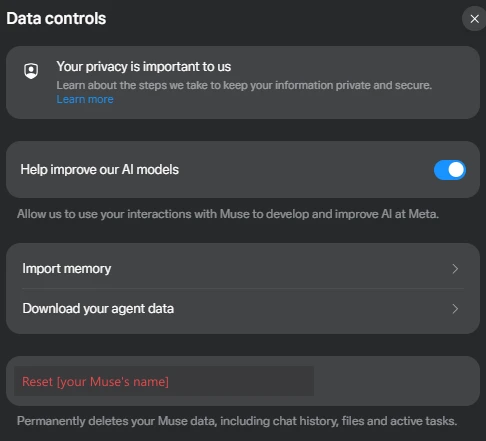
- Turn off AI trainingSettings → Data controls → switch off Help improve our AI models, then confirm.4 TestedThe switch is described in the app as “Allow us to use your interactions with Muse to develop and improve AI at Meta”, and it was on for our account.
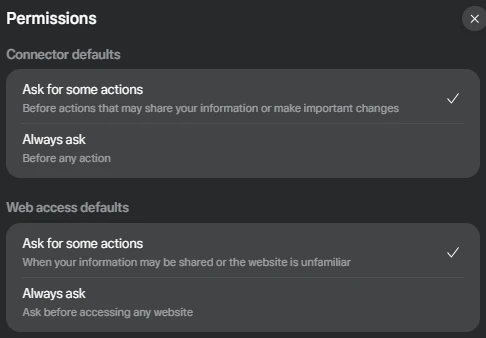
- Make Muse ask every timeSettings → Permissions has two defaults. Set both to Always ask until you trust how Muse behaves: Connector defaults (“Before any action”) and Web access defaults (“Ask before accessing any website”). TestedOn our account both were set to the looser “Ask for some actions”, which asks only “before actions that may share your information or make important changes” or “when your information may be shared or the website is unfamiliar”. Avoid “Always allow” for anything that sends messages or spends money.13
- Connect as little as possibleMuse works without connectors. Add them one at a time, and use read-only access where a connector offers it.14
- Hold back your most sensitive accountsOur suggestion: wait on banking, health and private messaging connections until the Confidential VM ships and early issues are resolved.
- Be careful with custom connectorsMeta doesn’t review connectors Muse builds for you from an API. Only connect services whose privacy terms you’ve checked.14
- On a Mac, review what you’ve allowedCheck both Muse’s own permission prompts and macOS privacy settings (System Settings → Privacy & Security), especially for Messages and Files.
- Clean up regularlyDelete individual messages, files and goals, or reset Muse entirely. In Settings → Data controls, the reset button is labeled with your Muse’s name (“Reset [name]”) and “permanently deletes your Muse data, including chat history, files and active tasks.” It can’t be undone, so use Download your agent data first if you want a copy. Meta notes Muse may still remember things it learned from deleted data.4
Who should wait
Our view, based on the evidence above: if a mistake by an agent would be costly for you, it’s reasonable to wait a few months. That includes handling client or patient information, running a business account where a wrong message causes real harm, or needing strong guarantees that the provider can’t read your data. Meta’s own roadmap (Confidential VM) and its response to the incidents above are the things to watch. We’ll update this page as they change.
Sources
- How we built safety into Muse Meta AI Research · Sept 8, 2026
- Muse product page and FAQ Meta · checked Sept 30, 2026
- How Muse handles your privacy, safety and security Meta Help Center
- How to manage your Muse data Meta Help Center
- Muse public bug bounty announcement Alexandr Wang, Meta Chief AI Officer, on X · Sept 8, 2026
- Meta hot-fixes Muse zero-day Unite.AI · Sept 22, 2026
- Meta’s new Muse AI agent read my private messages Inc. · Sept 19, 2026
- Meta bolsters Muse safety warning after security vulnerability found Reuters, via Yahoo Tech · Sept 25, 2026
- Man says Meta’s AI agent Muse shared his address… Moneywise via Yahoo Finance · Sept 28, 2026 · user report
- Meta Muse surpasses its competitors in data collection Surfshark research · Sept 28, 2026
- Meta’s Muse AI is exploding in popularity and drawing backlash Fortune · Sept 22, 2026
- About Muse subscriptions Meta Help Center
- How Muse works with your guidance and approval Meta Help Center
- How Muse works with Connectors Meta Help Center
Last fact-check: 2026-09-30. We re-check this page weekly and add new incidents with dates. Spotted something out of date? Tell us.
Frequently asked questions
Can Meta see my Muse data?
Potentially, yes. Meta says Muse’s current architecture “does not prevent Meta from accessing data when necessary to support, secure or operate the service.” A Confidential VM designed to stop that is planned for later in 2026.1
Does Meta use Muse data for ads?
Can Muse spend my money without asking?
Is the Muse app legit?
Yes. Muse is Meta’s own app; the official web address is muse.ai. The safety questions are about how it handles your data and actions, not whether it’s genuine.
Is Muse safe for teenagers?
Muse is for adults only: Meta requires users to be 18 or older (or the age of majority where they live).12