
Muse usage limit: what happens when you run out
Every Muse plan, including the free one, runs on a weekly allowance of Muse tokens. Here’s how to see where you stand, when it resets, and what you can do if you hit the limit mid-task.
Quick answer
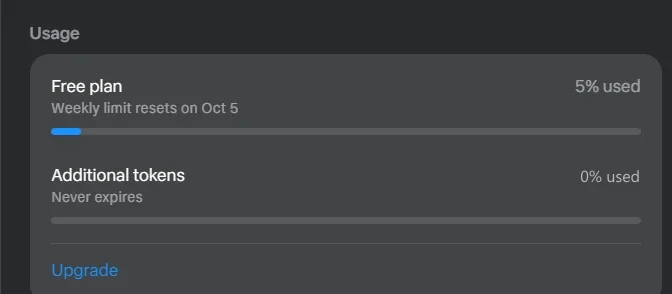
Muse gives every plan a weekly allowance of “Muse tokens.” You can see it in Settings → General → Usage (web), shown as a percentage with the date it resets. When you run out, Meta says you can wait for the limit to refresh or upgrade to Power ($20/month, 500 million tokens a week) or Maximum ($100/month, 3 billion). A separate “Additional tokens” balance, marked “Never expires,” sits on top of the weekly allowance.
Outside the US or Canada? Muse isn’t available there yet. You can join Meta’s waitlist, check which countries have it, or see what to use instead.
How we checked
TestedWe read the Usage panel on our own free account (muse.ai web app) on September 30 and again on October 2, 2026. We haven’t hit the limit ourselves yet, so the exact message Muse shows at the cap isn’t on this page yet. See how we label evidence.
Where to see your usage
- Open SettingsMenu (bottom left on the web) → Settings.
- General → UsageOn the web app, Usage sits inside the General page. Meta’s Help Center calls it Settings → Usage.2
- Read the two barsYour plan’s weekly bar, with “% used” and the reset date, and a separate “Additional tokens” bar.
How the weekly limit works
- TestedIt’s weekly, with a fixed reset date. Our panel said “Weekly limit resets on Oct 5” on September 30 (5% used) and still on October 2 (12% used). So the reset doesn’t slide with your usage; it’s a set day each week.
- TestedUsage is a percentage, not a number. The free plan never tells you how many tokens you have, only how much of the allowance is gone.
- Paid plans are bigger allowances, not unlimited. Power gives 500 million weekly Muse tokens and Maximum 3 billion.1
- ReportedThe free size is unconfirmed. Launch reporting cited 100 million tokens a week for free users; Meta’s Help Center doesn’t state it.3
How do Muse tokens work?
A Muse token is a unit of work, not a message. Every step Muse takes uses some: reading pages in its browser, thinking through a plan, working in connected apps and running background goals. A long research task or a goal that checks something every hour can use far more than a quick chat. Meta doesn’t publish how many tokens a typical task uses.
- Weekly allowance
- Power: 500 million Muse tokens a week; Maximum: 3 billion. The free plan’s size isn’t published.1
- Additional tokens
- TestedA separate balance marked “Never expires,” where bonuses such as invite rewards (1 billion tokens each) appear to go.
- How fast they go
- TestedOur free account went from 5% to 12% of its weekly allowance over two days of light testing (a few research tasks, reminders and checks).
- Not the same as API tokens
- Developers using Meta’s Model API pay per million tokens for Muse Spark; Meta doesn’t say those map to Muse app tokens, so don’t use API prices to value a plan. Pricing.
To make tokens last: give Muse specific instructions so it doesn’t explore, check goals daily rather than hourly, and delete goals you no longer need. Managing goals.
What happens when you hit the limit
Meta’s Help Center says that if you reach your free usage limit and want more, you can “upgrade to a paid subscription or wait until your free usage limit refreshes.”1 What Meta doesn’t spell out:
- whether goals already running pause or stop at the limit, and whether they pick up after the reset;
- whether “Additional tokens” are spent automatically once the weekly allowance runs out (the app shows them as a separate balance).
We’ll add the exact on-screen message when our test account reaches the limit.
Your options
- Wait
- The allowance refills on your reset date. Check it in the Usage panel.
- Upgrade
- Power ($20/month) or Maximum ($100/month). Plans renew monthly, and Meta says there are no partial refunds when you cancel. Details in Muse pricing.1
- Bonus tokens
- Invite rewards add to the “Additional tokens” balance, which doesn’t expire. See Muse invite codes.
- Use less
- Pause or delete background goals you no longer need, and give Muse narrower tasks. Long, open-ended research uses the most.
A note on prices outside the US
TestedThe upgrade screen shows prices in your account’s local currency, not always US dollars. The US prices are $20 and $100 a month, per Meta.1 Check the final amount at checkout before you subscribe.
Sources
- About Muse subscriptions Meta Help Center · checked Oct 2, 2026
- Subscribe to Muse Meta Help Center
- Meta debuts its Muse AI agent TechCrunch · Sept 8, 2026
Last checked in the app: 2026-10-02. Limits and plans can change without notice. Spotted a change? Tell us.
Frequently asked questions
Is there a Muse crypto token?
Not from Meta. Muse tokens are usage units inside the Muse app, not a cryptocurrency, and Meta hasn’t issued any coin. Anything sold as a Muse token, coin or presale isn’t Meta’s Muse.
How do Muse tokens work?
Muse tokens measure how much work Muse does. Every step uses some: reading a web page, thinking, working in a connected app or running a background goal. Each plan gets a weekly allowance (Power 500 million, Maximum 3 billion), shown in the app as a percentage. Meta doesn’t publish how many tokens a typical task uses.1
What happens when I reach Muse’s usage limit?
Meta says you can either wait until your free usage limit refreshes or upgrade to a paid plan. Muse’s weekly limit resets on a set date shown in Settings, and any “additional tokens” you have are used separately.1
When does Muse’s limit reset?
Once a week. The Usage panel shows the exact date (“Weekly limit resets on …”). On our account the date stayed the same across checks on September 30 and October 2, 2026, which suggests a fixed weekly reset day per account.
How many tokens does the free plan include?
Meta doesn’t publish the number. The app shows free usage only as a percentage. Launch coverage reported 100 million tokens a week, but that figure isn’t on Meta’s Help Center. Paid plans are 500 million (Power, $20/month) and 3 billion (Maximum, $100/month) a week.1
Do unused Muse tokens roll over?
The weekly allowance resets each week; Meta doesn’t describe any rollover. A separate “Additional tokens” balance, where bonuses such as invite rewards appear to go, is marked “Never expires” in the app.1