
How Muse works: the agent, its private computer and your approvals
What actually happens when you give Muse a task: where it runs, what it can touch, when it has to ask you, and what Meta itself says its design can’t yet prevent.
Quick answer
Muse is an AI agent that works on your tasks from its own private computer in Meta’s cloud. You give it a goal in a chat. It plans the steps with Meta’s Muse Spark models, then works through them in a built-in browser and the apps you’ve connected, building its own small tools if it needs one. A separate “Sentinel” agent checks every action that leaves that computer, and Muse asks for your approval before sensitive steps such as sending messages or buying things. It keeps going in the background until the job is done.
How we checked
TestedWe triggered a real approval prompt on our own account on October 1, 2026 (muse.ai web app): we asked Muse to send a test email to ourselves, then pressed Deny, so nothing was sent. We also checked the permission settings. Everything else is based on Meta’s security write-up, product page and Help Center. See how we label evidence.
The life of a Muse task
- You describe a goalYou write to Muse like a text thread. It isn’t turn-by-turn, so you can follow up without repeating yourself.6
- Muse plansIt works out which of its built-in skills the job needs. If a task needs a tool that doesn’t exist, Meta says Muse builds it.2
- It works on its own computerMuse browses the web in its own browser and pulls information from connected apps, step by step.2
- Sentinel checks outgoing actionsAnything that reaches the internet or a connected app goes through Sentinel. Depending on your settings, you get an approval request.13
- It keeps going and reports backMuse continues in the background, tracks progress toward goals, and keeps a history of what it did and plans to do.2
Inside Muse Secure VM
Muse Secure VM is a persistent, isolated Linux computer with a full browser, one per person, that both you and Muse can use.2 “Persistent” means it keeps your files and state between sessions; “isolated” means no one else’s agent can reach it.
Meta’s security write-up describes several layers inside it:1
- A locked-down “runtime cell” where the agent runs. Even full administrator (“root”) rights inside it don’t carry over to the machine underneath, and the system calls it can make are filtered.
- Credential surrogation. A separate service holds your real logins and tokens outside the agent’s cell and gives Muse stand-in tokens, so the agent never sees the real ones.
- One worker per connector. Code that talks to each connected service runs in its own restricted worker with access only to that service’s credentials.
Sentinel: the approval gatekeeper
Sentinel is a second agent on the same machine, kept separate from Muse, that decides what’s allowed out. Meta calls it “the sole permission authority” for connector actions and for all network traffic.1 It inspects outgoing requests in detail (where they’re going and what they contain) before letting them through. When your settings call for it, Sentinel is what triggers the approval request you see.
Approvals and permission levels
You control how often Muse asks, in Settings → Permissions.3
- Connector defaults: “Ask for some actions” (“Before actions that may share your information or make important changes”) or “Always ask” (“Before any action”).
- Web access defaults: “Ask for some actions” (“When your information may be shared or the website is unfamiliar”) or “Always ask” (“Ask before accessing any website”).
- Manage permissions: what you’ve already allowed, grouped as Connectors, Websites, Artifacts and Scheduled tasks.
TestedThose labels are quoted from Settings → Permissions on our account (muse.ai web app, October 1, 2026), where both defaults were set to “Ask for some actions”.
When Muse asks, the Help Center lists the choices as Allow once, Allow for this task, Allow for this site, Always allow or Deny. Meta recommends starting with low-risk tasks while you learn how Muse behaves.3
What a real approval prompt looks like
TestedThe buttons depend on the action. When we asked Muse to email a test message to ourselves, it stopped, showed “Needs approval” under its name, and displayed this prompt in the chat:
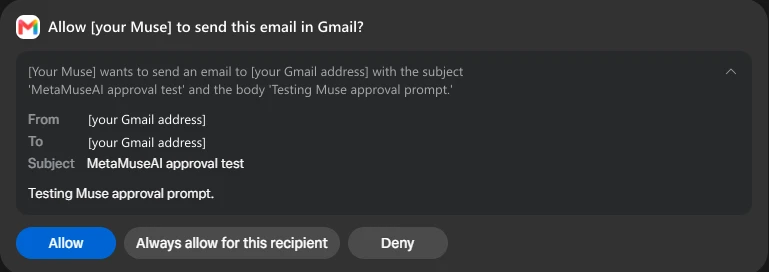
- It shows exactly what will be sent: a plain-language summary, then From, To, Subject and the message body.
- The choices were “Allow”, “Always allow for this recipient” and “Deny”, worded for the email action rather than the five generic options listed in the Help Center. “Always allow for this recipient” would let future emails to that address go out without asking.
- Deny worked as expected. A “Request denied” notice appeared, and Muse replied in the chat that the email hadn’t been sent and asked whether to try again.
How Muse browses the web
Muse uses a real browser inside your chat, and you can watch it or take over at any time. Tap Open browser to watch, Take control of the browser to pause Muse and do it yourself, or Stop the task to end it. Usernames and passwords you use while browsing go into a secure credential store the model can’t read. Muse may accept essential cookies on sites it visits, and it’s designed to confirm important steps like purchases.4
How connectors plug in
Connectors are opt-in links to apps and services that give Muse new abilities, like searching your email or seeing your calendar.5 See every app currently available in our Muse connectors list.
- Connect by asking Muse (“Connect my Gmail”) or in Settings → Connectors → Connect.
- Some connectors can be set to read-only, so Muse can look but not act.
- Facebook, Instagram and Threads connect automatically if they’re in the same Accounts Center as your Meta account.
- For services that aren’t listed, Muse can build a custom connector from the service’s API. Meta doesn’t review custom connectors, so check that service’s privacy terms yourself.
- Disconnecting stops new data flowing, but earlier conversations and memories may still contain information from it.
Memory and personality
Muse builds up memories from what you tell it, patterns it notices, your connected apps and a file-based memory system. You can rename it, change its tone and style, or ask it to go back to its default personality. You can also import conversation history from another AI assistant (Settings → Data Controls → Import memory).7
Goals and background work
Muse keeps working after you close the app. Meta’s example is watching the weather and alerting you when rain is coming.2 Longer efforts are tracked as goals (in a Goals tab), and files it creates are kept in a Library tab.8 Background work still uses your plan’s weekly allowance; see Muse pricing.
Muse on the Mac
The Mac app lets Muse work with files, messages, calendar, notes and mail inside their native Mac apps. Access is opt-in, and Muse asks for approval before sensitive actions.9 Mac access has been the source of the most serious early problems, which we cover in Is Muse safe?
What Meta itself says the design can’t prevent (yet)
- “Prompt injection remains an open problem in the industry — and Muse will sometimes make mistakes.” Prompt injection means hidden instructions on a web page or in an email that try to hijack an agent. Meta layers defenses: model training, several detection classifiers, labeling of untrusted content, and your approvals.1
- Today’s architecture “does not prevent Meta from accessing data when necessary to support, secure or operate the service.”1
- AnnouncedA “Muse Confidential VM”, designed to cryptographically prevent Meta from accessing your VM’s data, is planned for later in 2026.1
Sources
- How we built safety into Muse Meta AI Research · Sept 8, 2026
- Muse product page and FAQ Meta · checked Sept 30, 2026
- How Muse works with your guidance and approval Meta Help Center
- How your Muse agent browses the web Meta Help Center
- How Muse works with Connectors Meta Help Center
- How to get started with Muse Meta Help Center
- How to customize Muse’s personality and memories Meta Help Center
- How to manage your Muse data Meta Help Center
- Meta’s Muse hits Mac TechCrunch · Sept 18, 2026
Last fact-check: 2026-09-30. Spotted something out of date? Tell us.
Frequently asked questions
Does Muse run on my phone or in the cloud?
Can Muse see my passwords?
Does Muse keep working when I close the app?
Yes. Meta says Muse keeps working in the background on tasks you’ve given it, such as monitoring something and alerting you.2
What is Sentinel in Muse?
Sentinel is a separate agent on the same machine as Muse. Meta describes it as the only authority that approves connector actions and all network traffic, and it asks you when your settings require it.1