
Muse pricing: Free vs Power vs Maximum, explained
Muse has a free tier and two paid plans. Here’s what each costs, what a “Muse token” is, which plan makes sense, how billing and cancellation work, and why Meta One and Meta’s developer prices are something else entirely.
Quick answer
Muse is free to use with a usage limit. If you need more, there are two paid plans: Power at $20 a month (500 million Muse tokens per week) and Maximum at $100 a month (3 billion Muse tokens per week). Plans renew monthly and can be canceled anytime, but Meta doesn’t give partial refunds. Meta doesn’t publish the size of the free allowance or how many tasks a token budget covers.
How we checked
TestedWe checked the Usage and Upgrade screens on our own Muse account on September 30, 2026 (muse.ai web app, free plan), without buying anything. Dollar prices, billing and refund rules come from Meta’s Help Center, checked the same day. See how we label evidence.
How much does Muse cost?
Muse costs $0, $20 or $100 a month, depending on how much you use it. Each plan gives you a weekly allowance of “Muse tokens”, Meta’s unit for usage.1
| Plan | Price | Weekly usage | Good fit for |
|---|---|---|---|
| Free | $0 | Weekly limit; shown only as “% used” | Trying Muse, occasional tasks |
| Power | $20/month | 500 million Muse tokens | Regular use that hits the free limit |
| Maximum | $100/month | 3 billion Muse tokens | Heavy, long-running or many parallel tasks |
You need to be 18 or older and have a Meta account to subscribe.1 ReportedMeta told reporters at launch that it expects most people to stay on the free tier.12
Is Muse free?
Yes: Muse is free with a usage limit. When you reach it, Muse lets you upgrade or wait until your free usage refreshes.2
TestedOn our free account, Settings → General → Usage shows the free plan as a weekly limit with its next reset date (“Weekly limit resets on Oct 5”) and a bar showing the percentage used. It doesn’t show a token number, so the size of the free allowance still isn’t disclosed, even inside the app. A figure of 100 million tokens a week has circulated online since launch, but Meta hasn’t confirmed it anywhere we can find.
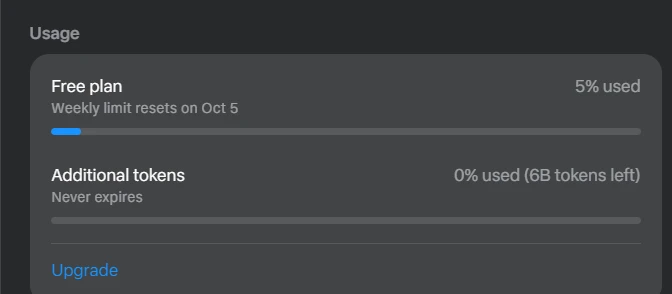
The same panel shows a second balance, “Additional tokens”, marked “Never expires” and tracked separately from the weekly limit. The screen doesn’t say where these come from. The likely source is Muse’s referral program, which gives both people 1 billion tokens per redeemed invite code; see how Muse invite codes work.
What is a Muse token?
A Muse token is Meta’s unit for measuring how much work Muse does for you. Paid plans come with a fixed number of Muse tokens each week.1 The in-app plan screen describes them the same way: “500M weekly Muse tokens” for Power and “3B weekly Muse tokens” for Maximum.
Meta doesn’t say how Muse tokens translate into tasks. In AI systems generally, “tokens” measure the text a model reads and writes, so our expectation is that long, multi-step jobs (browsing many pages, reading lots of email, running in the background for days) use far more than a quick question. That’s our analysis, not a Meta figure.
Which plan should you choose?
- Start on the free tierThere’s no published trial, and the free tier is the only no-risk way to see how quickly you use your allowance.
- Upgrade only if you keep hitting the limitIf you run out once, you can wait for it to refresh. If it happens every week and Muse is saving you real time, Power is the next step.
- Consider Maximum only for heavy, ongoing workMaximum costs five times as much as Power but gives six times the weekly tokens, so it’s cheaper per token (see below).
| Plan | Tokens per month (approx.) | Cost per 100 million tokens |
|---|---|---|
| Power ($20) | ≈ 2.17 billion | ≈ $0.92 |
| Maximum ($100) | ≈ 13 billion | ≈ $0.77 |
Allowances are set per week. Meta hasn’t said whether unused tokens carry over, so it’s safest to treat each week’s allowance as standing on its own.
How to upgrade to Power or Maximum
- Open SettingsIn the Muse app, tap Menu (top left), then Settings. On muse.ai, click Menu (bottom left), then Settings.3
- Go to UsageUnder Usage, select Upgrade. TestedOn muse.ai, Usage sits on the General page of Settings.
- Choose a plan, then ContinueThe screen is headed “Choose a plan”, with Power selected by default and Maximum below it. It notes that the subscription “renews until canceled” and that “prices may include taxes”. Select Continue to pay. You’ll get a confirmation notification, and the plan renews automatically each month.
Where you subscribe matters
You have to manage and cancel your subscription on the same platform, device type and account you used to buy it.3 If you upgrade on your iPhone, for example, you’ll manage it through Apple.
How to cancel a Muse subscription
- Open Manage subscriptionIn the app: tap your profile picture, then Menu → Settings → Manage subscription. On muse.ai: Menu → Settings → Manage subscription.4
- Cancel and confirmSelect Cancel, then Yes, cancel.
- Keep using it until the period endsYour plan stays active to the end of the current billing cycle. Meta doesn’t give credits or partial refunds unless the law requires it.
Deleting the app or signing out does not cancel your subscription.4
Billing details
- When you’re charged: monthly, on the date you first subscribed (or the last day of the month if that date doesn’t exist).5
- How you pay: payment methods depend on where you subscribed, such as the Apple App Store or Google Play.5
- Where to check it: Settings → Manage subscription shows your status, next renewal date and payment method.6
Muse plans vs Meta One, Muse Code and Meta’s API
Searches for “Muse pricing” often turn up three other Meta price lists that have nothing to do with the Muse app. Here’s how to tell them apart:
| What it’s for | Price | Who needs it | |
|---|---|---|---|
| Muse plans | More usage of the Muse agent app | Free · $20 · $100 per month1 | Muse users |
| Meta One | More Meta AI image and video generation and extra app features across Instagram, Facebook and WhatsApp | Core $7.99 · Premium $19.99 per month7 | Meta AI users; Meta doesn’t say it includes Muse |
| Muse Code | Meta’s AI coding agent for software developers | Separate monthly plans or per-token billing; see Meta’s developer site | Developers |
| Meta Model API | Using Muse Spark models in your own software | $1.25 per million input tokens, $4.25 per million output tokens (Muse Spark 1.1–1.3)8 | Developers |
Meta also says everyday Meta AI use stays free.7 If you want to understand how the two assistants differ, see Muse vs Meta AI.
What about Muse Charm and the glasses?
AnnouncedMuse Charm, “the first device made for Muse”, wasn’t on sale when we checked, and Meta hasn’t announced a price.9 Muse on Meta’s AI glasses has also been announced for the coming months.11 We’ll add hardware prices and whether they require a Muse plan when Meta publishes them.
Sources
- About Muse subscriptions Meta Help Center · checked Sept 30, 2026
- Muse product page and FAQ Meta · checked Sept 30, 2026
- Subscribe to Muse Meta Help Center
- Cancel your Muse subscription Meta Help Center
- Billing and payments for subscriptions from Meta Meta Help Center
- Manage your Muse subscription Meta Help Center
- Introducing Meta One Meta Newsroom · Sept 15, 2026
- Meta Model API: pricing and rate limits Meta developer docs · checked Sept 30, 2026
- Muse Charm Meta · checked Sept 30, 2026
- Muse for Small Business Meta Newsroom · Sept 29, 2026
- The biggest news from Connect 2026 Meta Newsroom · Sept 2026
- Meta debuts its Muse AI agent TechCrunch · Sept 8, 2026
Last fact-check: 2026-09-30. Prices and plans change. We re-check this page weekly. Spotted something out of date? Tell us.
Frequently asked questions
What are "additional tokens" in Muse?
On our account, Muse’s Usage panel shows “Additional tokens” as a separate balance, marked “Never expires”, next to the weekly plan limit. Muse doesn’t explain on that screen where they come from, but its Invite panel offers 1 billion bonus tokens to both people when a new user redeems a referral code, which is the likely source. See how Muse invite codes work.
Is Muse free?
Yes. Muse is free with a usage limit. When you reach it, you can upgrade to a paid plan or wait for your free usage to refresh. Meta doesn’t publish how big the free allowance is.2
Is there a free trial of the paid plans?
Meta’s Help Center doesn’t mention a free trial for Power or Maximum when we checked on September 30, 2026. The free tier is the way to try Muse.3
Does Meta One include Muse?
Meta hasn’t said so. Meta One (from $7.99 a month) adds more Meta AI image and video generation and app features; Meta’s announcement doesn’t mention Muse agent usage. Muse has its own Power and Maximum plans.7
Can I get a refund if I cancel?
Generally no. Meta says it doesn’t give credits or partial refunds for canceled Muse subscriptions unless required by law. Your plan stays active until the end of the billing period.4
Are there Muse promo codes or discounts?
Meta hadn’t announced any discounts or promo codes for Muse plans when we checked. Be careful with sites offering Muse codes, and never enter your Meta login on a third-party site.
Does Muse for Small Business cost extra?
Meta says Muse stays free for most uses, with the same paid plans available; it hasn’t announced a separate business price.10