
How to get rid of Meta Muse (and opt out of what it uses)
“Opt out of Muse” usually means one of three things: stopping Meta’s Muse Image tool from using your Instagram photos, stopping Meta from training on your Muse chats, or getting rid of Muse altogether. The first one changed in July, and many guides haven’t caught up.
Quick answer
Instagram photos: the Muse Image feature that could use public Instagram accounts was removed on July 10, 2026, so there’s nothing new to opt out of; the July toggle no longer appeared on Instagram’s web settings when we checked. AI training on your Muse chats: in Muse, open Settings → Data controls and switch off Help improve our AI models. Getting rid of Muse: Data controls → Reset deletes your Muse data; deleting your Meta account deletes Muse entirely.
How we checked
TestedWe read Muse’s Data controls on our own account (October 1, 2026) and Instagram’s Sharing and reuse settings on the web (October 5, 2026), without changing anything. The rest comes from Meta’s announcements and Help Center, and from news reports where labeled. See how we label evidence.
Which “opt out” do you mean?
| You want to stop… | Where | Status |
|---|---|---|
| Others making AI images from your public Instagram | Instagram (Muse Image feature) | Feature removed July 10, 2026 |
| Meta training AI on your Muse chats | Muse → Settings → Data controls | On by default; you can turn it off |
| Muse keeping your chats, files and tasks | Muse → Settings → Data controls → Reset | Permanent, can’t be undone |
| Muse reaching your apps | Muse → Settings → Connectors / Messaging channels | Disconnect any time |
| Paying for Muse | Settings → Manage subscription | Cancel steps |
Instagram photos and Muse Image
Muse Image is Meta’s image-generation model, part of Meta AI. It is not a feature of the Muse agent at muse.ai, even though the names overlap.1 See Muse vs Meta AI.
- July 7, 2026: Meta launched Muse Image with the option to generate images by “@-mentioning public Instagram accounts.”1
- ReportedHow it worked: public accounts were included by default, and Meta’s help page said “you won’t get a notification if someone uses your content to create an AI image.” The reported opt-out was Instagram’s Sharing and reuse page: turn off Posts and Reels under “Allow people to create with and reuse your content on Instagram and with AI features at Meta.” Turning it off didn’t delete images already made.2
- July 10, 2026: Meta updated its announcement: “We’ve heard the feedback that this feature missed the mark, so it’s no longer available.”1
TestedOn October 5, 2026, Instagram’s Sharing and reuse page on the web listed Story shares, Posts and reels to stories, Reposts on posts and reels, and Website embeds, and nothing about AI. We checked one account on the web only, not the phone app, so we can’t say whether the toggle still exists there.
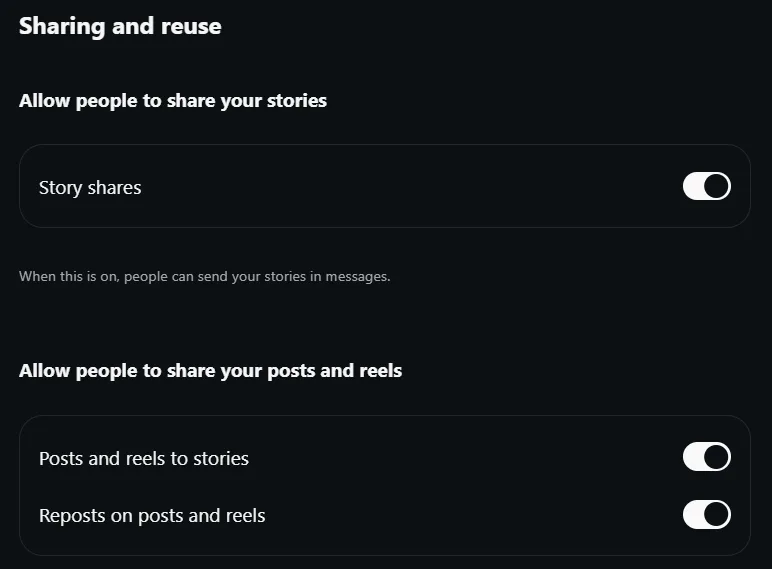
What you can still do: if you see the July toggle in your Instagram app, turning it off costs nothing. Making your account private keeps your posts out of public reach generally. Neither step removes images someone made before July 10.
Stop Meta training AI on your Muse chats
- Open SettingsIn Muse: Menu (bottom left) → Settings.
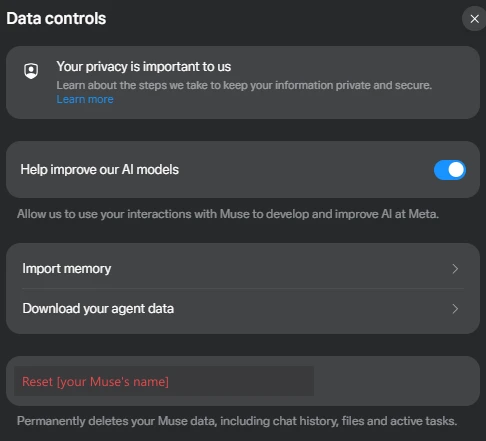
- Data controlsFind Help improve our AI models: “Allow us to use your interactions with Muse to develop and improve AI at Meta.”
- Switch it offTurn the switch off.
The setting is on by default, and turning it off “also applies to previous interactions.”3 On a Mac, Meta says your Muse interactions, “including screenshots,” can be used to improve its AI unless you turn this off.4 TestedThe switch was on in our account.
Turn Muse off or delete it
- Disconnect apps
- Settings → Connectors (Gmail, Calendar and others) and Messaging channels (WhatsApp) each have a Disconnect option.
- Reset Muse
- Data controls → Reset deletes “all information including chat history, files and active tasks” and “cannot be undone.”3 Download a copy first if you want one.
- Delete everything
- Deleting your Meta account in Accounts Center deletes all its information, “including Muse.” It affects other Meta services on that account.3
- Stop paying
- Resetting or deleting doesn’t cancel a paid plan. Cancel it separately.
Step-by-step for each, with screenshots: how to manage or delete your Muse data.
Sources
- Introducing Muse Image (with July 10 update) Meta Newsroom · July 7, 2026 · checked Oct 5, 2026
- Meta’s new AI image tool can use your public Instagram photos by default MacRumors · July 8, 2026
- How to manage your Muse data Meta Help Center · checked Oct 5, 2026
- How Muse works with files and apps in your Mac Meta Help Center · checked Oct 3, 2026
Last checked: 2026-10-05. Seeing an AI toggle we don’t mention? Tell us.
Frequently asked questions
How do I get rid of Muse?
It depends which Muse you mean. To delete the Muse agent, reset it in Settings → Data controls and uninstall the app. To stop Meta training AI on your Muse chats, turn off Help improve our AI models. If it’s an AI chat inside Facebook, Instagram or WhatsApp, that’s Meta AI, which can be muted but not fully removed.
Can Meta Muse still use my Instagram photos?
Not through the feature people were worried about. Meta removed Muse Image’s option to @-mention public Instagram accounts on July 10, 2026, three days after launch, saying it “missed the mark.” Images made before then weren’t deleted when people opted out, according to Meta’s help page as quoted by MacRumors.12
Where is the Instagram AI opt-out setting?
In July it was reported under Settings and activity → Sharing and reuse in the Instagram app. When we checked Sharing and reuse on Instagram’s website on October 5, 2026, it no longer showed any AI option. We didn’t check the phone app.
How do I stop Meta training AI on my Muse chats?
In Muse, go to Settings → Data controls and turn off “Help improve our AI models.” Meta says it’s on by default and that turning it off also applies to previous interactions.3
How do I delete my Meta Muse account?
There are two levels. Settings → Data controls → Reset permanently deletes your Muse chats, files and tasks but keeps your Meta account. Deleting your Meta account in Accounts Center deletes Muse with it. Cancel any paid plan separately.3