
How to contact Muse support
Muse has no support phone line or live chat that we could find. Help runs through a few routes inside the app and Meta’s Help Center, and the right one depends on your problem. Here’s which to use, based on what the app actually shows.
Quick answer
Muse support is in the app, under Menu → Settings → Help & support. It has four options: the Muse Help Center, Submit feedback, Report an issue, and a Contact us link for the Muse Home Link device. There’s no phone line or live chat that we could find. Billing for App Store or Google Play subscriptions goes through Apple or Google. Privacy questions go through Meta’s Privacy rights request page.
How we checked
TestedWe opened Settings → Help & support on our own account (muse.ai web app, October 6, 2026) without sending anything, and read Meta’s Muse Help Center. See how we label evidence.
What’s in Help & support
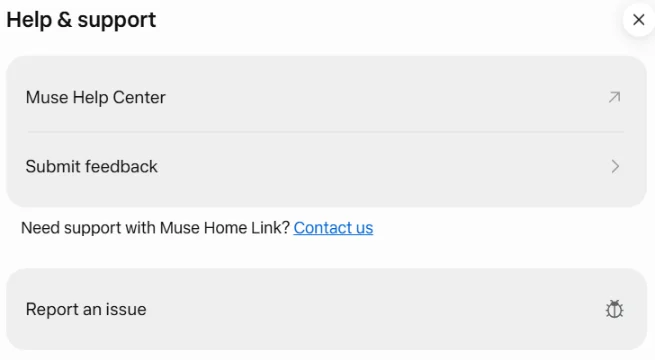
- Muse Help Center
- Opens Meta’s Muse help hub: getting started, connectors, browsing, approvals, data, payments, skills, memories, reminders, the Mac app and subscriptions.1
- Submit feedback
- For suggestions and general comments.
- Report an issue
- For bugs and things that went wrong. Also in the main menu (≡) at the bottom left of muse.ai.
- Contact us (Home Link)
- Opens a Meta support form, only for the Muse Home Link device.
Which route for which problem
| Problem | Go to |
|---|---|
| Something broke or a task failed | Report an issue; first try our fixes |
| A how-to question | Muse Help Center, or ask Muse itself |
| An idea or complaint | Submit feedback |
| A charge, refund or cancellation | App Store or Google Play if you subscribed there; otherwise Settings → Manage subscription. Steps |
| A purchase Muse made | The store you bought from, then your bank or Link. Protections |
| Your data | Settings → Data controls (download, AI training, reset). How |
| You don’t use Muse but are concerned about your information | Meta’s Privacy rights request page2 |
| Your business gets AI phone calls from Muse | Meta’s opt-out form2 |
| Your Muse Home Link device | Help & support → Contact us |
How to write a report that gets fixed
- Say what you asked, in the words you used.
- Say what happened, including any status text such as “Connecting…” or “Waiting for you.”
- Add when and where: the time, and whether you were on the web, phone, Mac or WhatsApp.
- Leave out passwords and card numbers. Support never needs them.
If you don’t use Muse
Meta’s Help Center has a page for people who don’t use Muse. It says information about you may reach Muse when a user shares it or when Muse reads public web pages; that Meta doesn’t link this information to a Meta account; and that “we don’t sell your information, and we never will.” You can contact Meta through its Privacy rights request page.2
The same page says Meta is “experimenting with the ability for Muse to make phone calls” to businesses with public numbers, and that a business can opt out using this form.2 More on how Muse handles other people: people pages.
Found a security problem?
At launch, Meta’s Chief AI Officer announced a public bug bounty for Muse, with rewards of up to $300,000.3 Report vulnerabilities there rather than through Report an issue.
Sources
- Muse Help Center Meta · checked Oct 6, 2026
- Information for people who don’t use Muse Meta Help Center · checked Oct 6, 2026
- Muse public bug bounty announcement Alexandr Wang, Meta Chief AI Officer
Last checked in the app: 2026-10-06. If Meta adds a support channel, tell us.
Frequently asked questions
How do I contact Muse customer service?
In Muse, open Menu → Settings → Help & support. It offers the Muse Help Center, Submit feedback and Report an issue. We didn’t find a phone number or live chat in the app or the Help Center.
How do I report a bug in Muse?
Use Report an issue, either in Settings → Help & support or in the main menu at the bottom left of muse.ai.
Who do I contact about a Muse charge or refund?
If you subscribed through the App Store or Google Play, billing is handled by Apple or Google. If you subscribed on muse.ai, manage it in Settings → Manage subscription. See how to cancel.
I don’t use Muse. How do I ask Meta about my information?
Meta says people who don’t use Muse can contact it through its Privacy rights request page, and businesses can opt out of Muse’s AI phone calls with a form.2