
Muse connectors: every app Muse can connect to
We checked Muse’s own connector list on our account and grouped every app it can link to. We also flag what Meta has announced but that isn’t in the app yet, and explain how to connect apps without giving away more than you need to.
Quick answer
On September 30, 2026, the Muse web app listed 54 connectors when we checked our own account. They include Gmail and the full Google Workspace set, Outlook, Meta’s own apps (Facebook, Instagram, Messenger, Threads), work tools like Slack, Notion, Zoom and Zapier, business tools like Shopify, QuickBooks and Stripe, and health and home apps like Peloton, Withings, Philips Hue and Spotify. Big retailers Meta announced in September (Walmart, Best Buy, Sephora and others), plus Instacart, Expedia and PayPal, weren’t in the app yet.
How we checked
TestedChecked in Settings → Connectors on our own Muse account, September 30, 2026, using the muse.ai web app in Chrome on Windows. We looked but didn’t connect or change anything. The iPhone and Android apps may show a few phone-only connectors, and rollouts can differ between accounts.
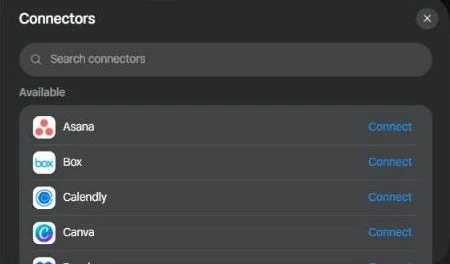
All Muse connectors, by category
| Category | Connectors | Count |
|---|---|---|
| Gmail, Google Calendar, Google Contacts, Google Docs, Google Drive, Google Forms, Google Sheets, Google Slides, Google Tasks | 9 | |
| Microsoft | Outlook Mail, Outlook Calendar, Outlook Contacts | 3 |
| Meta apps | Facebook, Instagram, Instagram Messages, Messenger, Threads, Threads Messages, Meta Business Manager | 7 |
| Work & productivity | Asana, Box, Calendly, Dropbox, Evernote, Granola, Linear, Notion, Slack, Todoist, Zapier, Zoom | 12 |
| Business & commerce | HighLevel, Klaviyo, Printify, QuickBooks, Shopify, Stripe | 6 |
| Design | Canva, Figma | 2 |
| Developer & building | GitHub, Lovable, Replit, Tailscale, Vercel | 5 |
| Money | Finances (Plaid) | 1 |
| Health & fitness | Function Health, HealthEx, Peloton, Withings | 4 |
| Home & lifestyle | OpenTable, Philips Hue, Spotify, Tessie | 4 |
| Built in | Browser | 1 |
Names are exactly as they appear in the app. “Finances (Plaid)” links bank accounts through Plaid, and Tessie is a Tesla companion app.
Muse for Small Business connectors
All 15 business connectors Meta announced on September 29, 2026 were already in the app when we checked: Asana, Box, Canva, Dropbox, Figma, Granola, HighLevel, QuickBooks, Klaviyo, Lovable, Notion, Shopify, Slack, Stripe and Zoom.2 We also saw a Meta Business Manager connector, which fits Meta’s description of Muse working with Facebook and Instagram business accounts.
Announced, but not in the app yet
| Connector | What Meta said | In the app? |
|---|---|---|
| Walmart, Best Buy, Sephora, Gap, Wayfair, Ulta, American Eagle, DICK’S Sporting Goods, Fanatics, Michael Kors | AnnouncedShopping partners at Connect 20263 | Not yet |
| Instacart | AnnouncedGroceries, Connect 20263 | Not yet |
| Expedia | Announced“Coming soon”3 | Not yet |
| PayPal, Shop Pay | AnnouncedPayment support34 | Not in the connector list |
| 1Password | Announced“Coming soon”4 | Not in the connector list |
Payment options may end up in Muse’s separate Wallet section rather than as connectors. We’ll update this table as each one appears.
Named elsewhere, but not in our list
A few connectors named by Meta or by other trackers didn’t appear in the web app on our account:
- Apple Health and Android SMS are named in Meta’s Help Center.1 They may be available only in the phone apps.
- ReportedOther trackers list Ticketmaster, Telegram, Duffel and Meta Catalog. They weren’t in our web list; they may be phone-only, limited to some accounts, or changed since.
How to connect an app to Muse
- Ask, or open SettingsTell Muse something like “Connect my Gmail”, or go to Settings → Connectors. There’s a search box at the top of the list.1
- Tap ConnectNext to the app you want, select Connect, read what Muse will be able to do, then Continue.
- Sign in to the appFinish the app’s own sign-in or authorization. Connected apps then move to the “Connected” section at the top.
Muse connects to Facebook, Instagram and Threads automatically if those accounts are in the same Accounts Center as your Meta account.1 For how connector actions are checked and approved, see how Muse works.
Read-only access and disconnecting
- Some connectors can be set to read-only, so Muse can look but not act (for example, see calendar invites without replying).1
- By default, Muse asks before significant actions such as sending an email.1
- You can disconnect anytime in Settings → Connectors. That stops new data flowing, but earlier conversations and Muse’s memories may still contain information from the app.1
Custom connectors
If an app isn’t listed, you can ask Muse to build a custom connector from the service’s API. Muse stores the API credentials in its secure credential store. Meta doesn’t review custom connectors, so it’s up to you to check what the service does with your data.1
Should you connect everything?
No. Connect what a task actually needs. Every connector widens what Muse can read and do, and Muse’s first weeks included reports of it acting further than users expected. Our suggestion is to start with read-only access where offered, keep approvals on “Always ask”, and hold back banking and health connectors until you’ve seen how Muse behaves. The evidence behind that is in Is Muse safe?
For developers: getting listed
Meta invites partners to apply to build connectors at muse.ai/platform.2 ReportedTechCrunch reported more than 1,500 developer applications in under a week.8 Meta says it doesn’t review custom connectors that Muse builds for an individual user.1
Change log
- 2026-09-30: First in-app check: 54 connectors (web app). All 15 Muse for Small Business connectors present. Retail partners, Instacart, Expedia, PayPal, Shop Pay and 1Password not yet listed.
Sources
- How Muse works with Connectors Meta Help Center
- Muse for Small Business Meta Newsroom · Sept 29, 2026
- The biggest news from Connect 2026 Meta Newsroom · Sept 2026
- Introducing Muse Meta Newsroom · Sept 8, 2026
- Meta’s Muse AI is exploding in popularity and drawing backlash Fortune · Sept 22, 2026
- Meta’s Muse hits Mac TechCrunch · Sept 18, 2026
- Muse product page Meta · checked Sept 30, 2026
- Everything new coming to Meta’s AI agent Muse TechCrunch · Sept 23, 2026
Last checked in the app: 2026-09-30. We re-check this list weekly and record changes in the change log. Seen a connector we’re missing? Tell us.
Frequently asked questions
How many connectors does Muse have?
On September 30, 2026, the Muse web app listed 54 connectors on our account, including the built-in Browser. Meta keeps adding more, and the phone apps may show a few extra.
Does Muse work with Amazon?
No. There’s no Amazon connector, and Amazon says access by Muse violates its Conditions of Use and has blocked it from shopping there.5
Can Muse connect to Apple Calendar or iCloud?
There’s no Apple Calendar or iCloud connector in the web app list. On a Mac, the Muse app can work inside Apple’s own apps, including Calendar and Mail, on an opt-in basis.6
Is WhatsApp a Muse connector?
Not in the connector list. Muse’s settings have a separate “Messaging channels” section, and Meta says you can chat with Muse directly in WhatsApp.7
Can I connect an app that isn’t on the list?
Yes, by asking Muse to build a custom connector from that service’s API. Meta doesn’t review custom connectors, so check the service’s privacy terms first.1