
How to delete Muse chats, memories and data
Muse keeps chats, files, goals and a memory of you on its private cloud computer. Here’s how to see it, download it, delete parts of it or wipe it completely, with the exact settings paths and what each option really removes.
Quick answer
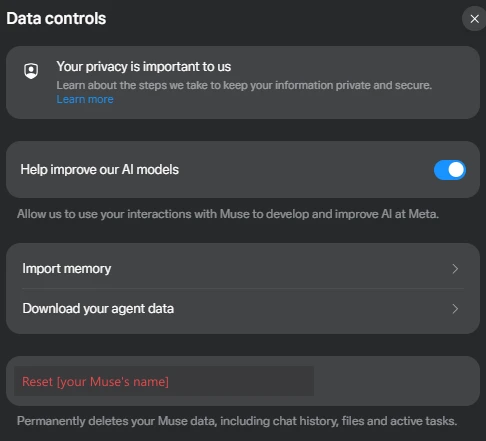
Most controls are in Settings → Data controls. There you can turn off Help improve our AI models (on by default), download your Muse data, and reset Muse, which permanently deletes all chats, files and active tasks. You can also delete single messages, chats, goals and files, edit Muse’s memory, and disconnect apps in Settings → Connectors. One catch: Meta says Muse may still remember things it learned from what you delete, so check its memory too.
How we checked
TestedWe opened Settings → Data controls on our own account (muse.ai web app) on October 1, 2026, and checked Settings → Connectors on October 2, without changing anything. Steps for deleting individual items come from Meta’s Help Center; we didn’t delete or reset anything. See how we label evidence.
What Muse keeps about you
Muse stores your information on its own isolated cloud computer, with backups.3 According to Meta’s Help Center, that includes:12
- Chats: your messages and Muse’s replies, including side chats.
- Goals and tasks: ongoing jobs, reminders and scheduled work.
- Files: documents and artifacts Muse made or you uploaded, plus “system files.”
- Memory and identity: what Muse has learned about you and how it behaves, kept in files Meta calls Memory.md and Soul.md.
- Logins: passwords you’ve shared, held in a secure credential store that Meta says the AI model doesn’t see.
Meta also says Muse “doesn’t share your conversations or the data in your virtual machine with Meta ad systems.”3
Turn off AI training
- Open SettingsMenu → Settings (Ctrl + , on the web).
- Data controlsFind Help improve our AI models. The web app describes it as “Allow us to use your interactions with Muse to develop and improve AI at Meta.”
- Turn it offSwitch it off and confirm.
The setting is on by default, and Meta says the change “also applies to previous interactions.”1 When it’s on, Meta says it removes certain personal details, such as names, email addresses, phone numbers and Social Security numbers, and disassociates the data from your account before training.3 TestedOn our account, the switch was on.
Download a copy of your data
- Muse data: Settings → Data controls → Download your Muse data (labeled “Download your agent data” on the web), then Download.1
- Your wider Meta account: Accounts Center → Your information and permissions → Export your information → Create export.1
Do this before a reset. The reset can’t be undone.
Delete individual messages, goals and files
Meta’s Help Center gives these steps. The tab names are from the mobile app; the web app arranges them in its sidebar.1
| What | How |
|---|---|
| A message | Tap and hold the message → Delete → confirm |
| A side chat | Open the chat → three-dot menu → Delete → confirm |
| A goal | Goals tab → the goal → three-dot menu → Delete → confirm |
| A file | Library tab → the file → delete |
| A reminder or task | Ask Muse in chat to change or delete it |
Check and edit what Muse remembers
Deleting a chat doesn’t guarantee Muse forgets what it learned from it. Meta says plainly that “Muse may still remember information it learned from what you deleted.”1 To deal with that:
- Look at its memory. Meta’s Help Center says Muse keeps what it knows in a file you can view, MEMORY.md, found under the Assistant icon → Identity → Memory.13
- Edit or delete entries directly in the Memory.md and Soul.md files.1
- Ask it to forget. Meta describes a “forget skill”: ask Muse to remove a specific topic from its memory.3
- Imported memory from another AI assistant (Settings → Data controls → Import memory) becomes part of what Muse knows, so only import what you’re comfortable keeping there.2
Disconnect apps
Muse can only reach apps you’ve connected. Disconnect any you no longer use in Settings → Connectors.4 TestedOn the web, that screen lists your connected apps first, then available ones, with a search box. Settings also has a separate Secure store section; we didn’t open it, because it can show saved logins. Our connectors tracker explains what each connection can see.
Reset Muse completely
- Download firstIf you want a copy, download your data (above).
- Settings → Data controlsChoose the reset option. On the web it’s labeled with your Muse’s name, “Reset [name].”
- ConfirmTap Reset to confirm.
A reset deletes “all information including chat history, files and active tasks,” and “resetting Muse cannot be undone.”1 It doesn’t cancel a paid plan; manage that separately (see Muse pricing).
Delete Muse along with your Meta account
Removing Muse completely (plan, apps, data and the app itself)? Follow how to delete your Muse account, step by step.
Deleting your Meta account in Accounts Center deletes “all information associated with your account, including Muse,” according to Meta.1 That’s a bigger step: it can affect other Meta services tied to the same account, so read Meta’s account deletion instructions first.
What Meta’s documents don’t answer
- How long backups are kept after you delete something. Meta mentions backups but doesn’t give a retention period for them.3
- Whether Meta staff can see your data. Meta says it can access data “when necessary”; see Is Muse safe?
- Data already used for training before you switched training off. Meta says the switch applies to previous interactions, but not whether models already trained are changed.1
Sources
- How to manage your Muse data Meta Help Center · checked Oct 2, 2026
- Muse personality and memories Meta Help Center · checked Oct 2, 2026
- How Muse handles your privacy, safety and security Meta Help Center · checked Oct 2, 2026
- How Muse works with Connectors Meta Help Center
Last checked: 2026-10-02. Meta changes settings labels often. Spotted a difference? Tell us.
Frequently asked questions
How do I stop Meta from training AI on my Muse chats?
Go to Settings → Data controls and turn off Help improve our AI models. It’s on by default. Meta says the change also applies to your earlier interactions.1
How do I delete everything in Muse?
Use the reset in Settings → Data controls. Meta says it permanently deletes all your Muse data, including chat history, files and active tasks, and it can’t be undone. Download your data first if you want a copy.1
Does deleting a message make Muse forget it?
Can I download my Muse data?
Yes. In Settings → Data controls, choose the download option (on the web it’s labeled “Download your agent data”). Your wider Meta account data can be exported from Accounts Center.1
Does deleting my Meta account delete Muse?
Yes. Meta says deleting your Meta account through Accounts Center deletes all information associated with it, including Muse.1